
Page properties
Under Page Properties, you’ll find the settings for configuring a page – for example, hiding navigation, enabling or disabling the internal search, adding the page’s metadata
There are two ways to access the properties of a page.
On the page
Directly from the page, via the Page information dropdown.

Via the site structure
Select the page in the site tree and click on Properties in the top menu, or press the P key on your keyboard.

Title
The title of the page as it appears in the site structure.
Tags
Add relevant tags from the list.
Swedbank only content
- Add the tag Source: Swedbank if the page is intended for Swedbank only.
- The page will then not appear in the savings banks’ MSM dashboard (no notification will be sent).
- If the tag is removed, a notification will be sent to the savings banks. They can choose to roll out the page in their own site structure.
Hide in Navigation
Tick this box if you want the page to be excluded from the On-page navigation component.
Footer fragment path
Currently unspecified.
Page title
This is the title displayed in the browser tab and in Google search results. It should be between 49 and 59 characters in length.
Navigation title
This is the name of the page shown in the site navigation. If left blank, the navigation title will default to the main Title.
Subtitle
Currently unspecified.
Description
Write a brief summary of the page. This appears in search results and on Google, similar to the page title. It should be between 130 and 160 characters long.

On time
Specify a publishing date for the page.
Off time
Specify a date when the page should be unpublished.
WCMS Vanity URL
Not in use! Vanity URLs are managed in the Redirect Manager.
Canonical URL
If the page is a duplicate, select the original page as the canonical version.
Don't index this page
Tick this box if you do not want the page to be indexed. This means it will not appear in search results on the site or on Google.
Page owner
Search for and assign the page owner from the system directory. This must be an individual and the field is mandatory. It is used for the Mandatory Page Review process.
Contact
Enter the page owner’s name. In some cases, you may use the name of a shared mailbox. On the intranet, this field is visible to visitors.
Contact e-mail
Enter the page owner’s email address. In some cases, a shared mailbox address may be used.
Latest review (automatic field)
Do not fill in this field! It is set automatically. The page receives a creation date upon publishing, and this is updated during Mandatory Page Review.
Note: You will not be able to save and close the page properties without completing the Page owner and Contact information fields.

Please note!
You will not be able to save and close the page properties without completing the Page owner and Contact e-mail fields.
Settings
Design
Not in use at the moment.
Alias
Not in use at the moment.
More information about Branch Office
Learn more about how to configure the Branch Office search.
Navigation
Not in use at the moment.

Subsite options
Learn more about how to configure a subsite.
Search
Check the box if you want to hide the search bar in the header on the specific page.
Templates settings
Not in use at the moment.
Authentication requirements
Not in use at the moment.

Export
Not in use at the moment.
SEO
Canonical URL
Not in use at the moment.
Robot tags
Not in use at the moment.
Generate sitemap
Not in use at the moment.

Live copy functionality is only available on pages that are live copies. It is used by savings bank editors who wish to suspend, resume, reset, or synchronise a page.

Synchronize
Synchronize the page with the Swedbank page. It's only possible to synchronize one page at a time.
Suspend (Resume)
Suspend (cancel) inheritance from the Swedbank page. You can suspend just the selected page or include its child pages. Inheritance can be resumed at any time. Once suspended, the option changes to "Resume".
Reset
Reset the page, removing all local modifications. So all local content will be removed on that page.
Detach – Do not use!
This option permanently breaks inheritance from the master site. Once detached, you cannot roll out changes or re-enable inheritance.

Rollout
Under the Rollout tab, the savings banks’ live copies of the page are displayed, along with information on when the local pages were last modified and when they were rolled out.
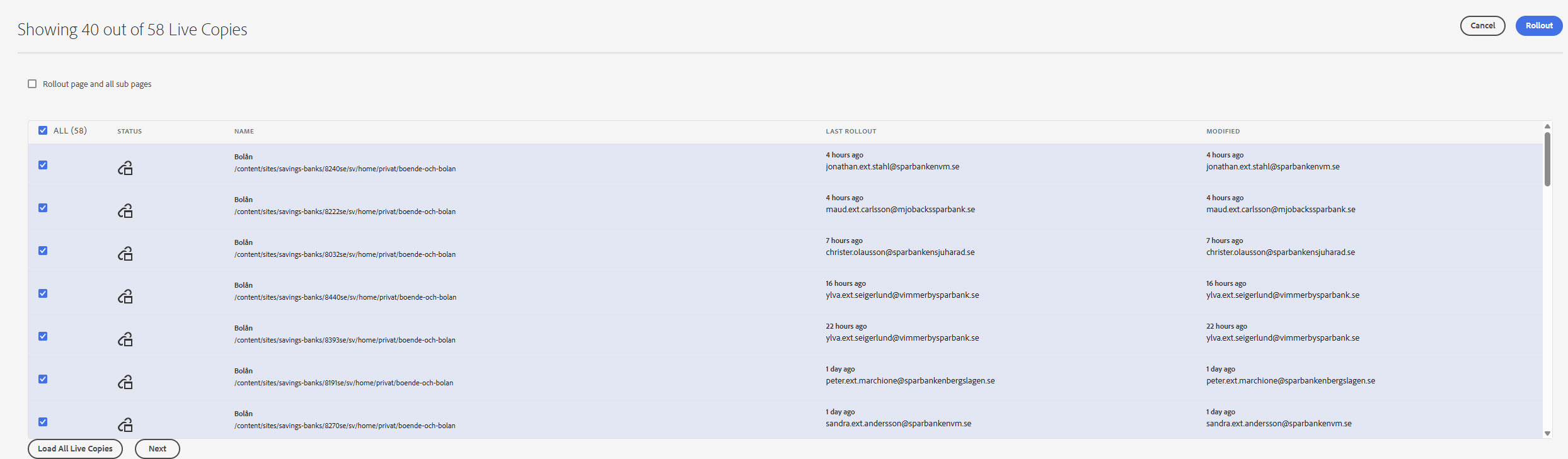
Current live copies
Shows which Savings Banks sites that have a copy of the page.
Live copy overview
Entry point to the Live Copy Overview function.
- Live Copy Overview (old AEM Help)